[n8n-template] Generatore e verificatore di certificati
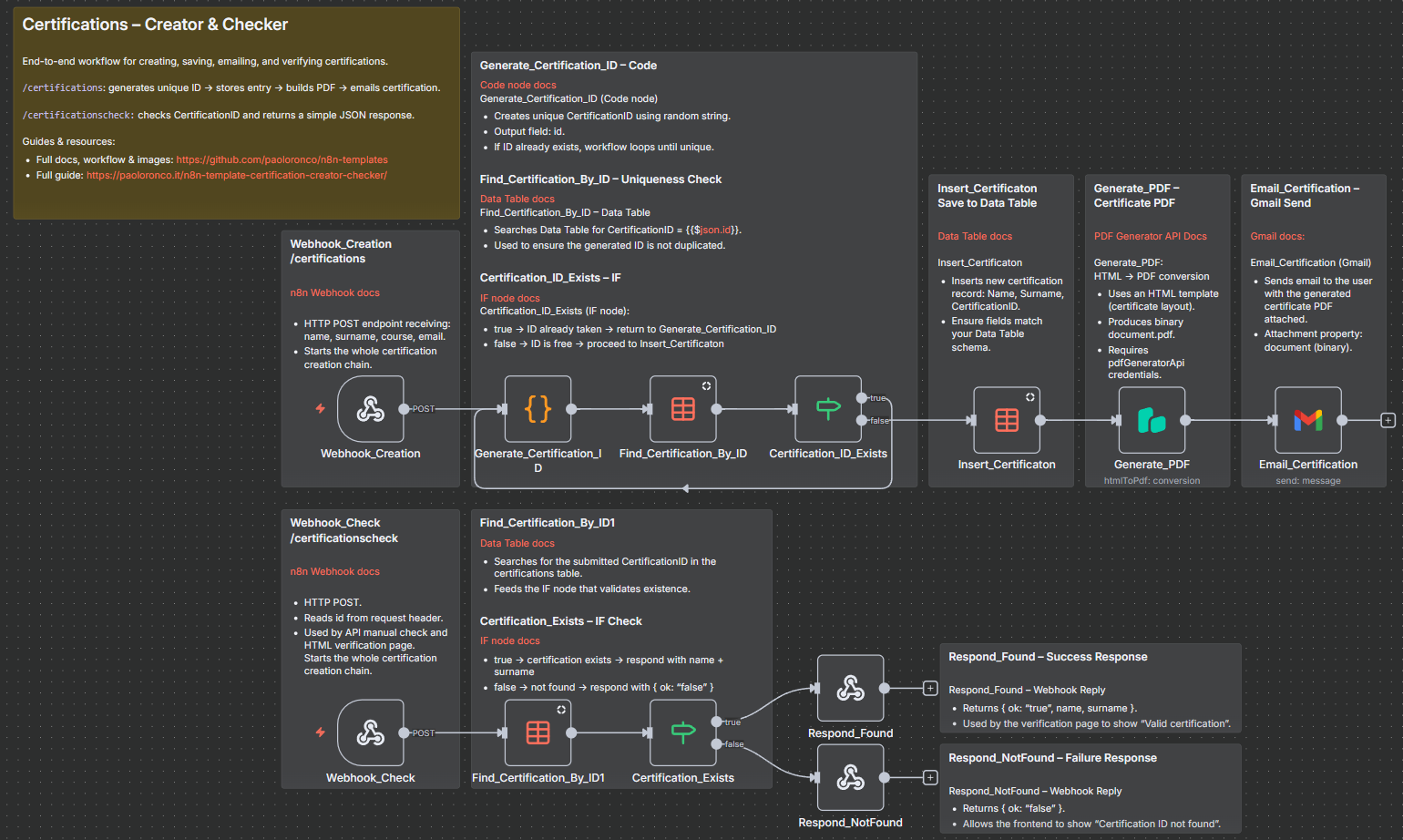
Questa guida presenta un sistema completo per la gestione delle certificazioni, realizzato con n8n. Automatizza l'intero ciclo di vita di un certificato digitale: dalla…
Questa guida presenta un sistema completo per la gestione delle certificazioni, realizzato con n8n. Automatizza l’intero ciclo di vita di un certificato digitale: dalla creazione alla generazione del PDF, fino alla verifica tramite API o una pagina HTML intuitiva.
Scopri tutti i miei workflow su GitHub: paoloronco/n8n-templates
Video: YouTube - Generatore e validatore di certificati
Consulta il workflow sull’hub n8n Creators: [prossimamente]
🔥 Cosa fa questo workflow
🎓 1. Creazione del certificato
Genera automaticamente un certificato completamente personalizzato quando riceve una nuova richiesta:
- Accetta i dati del candidato tramite un webhook POST (
/certifications) - Legge i campi: name, surname, course, email
- Produce un ID di certificazione univoco mediante un algoritmo di generazione personalizzato
🗂 2. Archiviazione dei dati
Archivia ogni certificato emesso in una Data Table di n8n, includendo:
- Nome del candidato
- Cognome del candidato
- ID di certificazione
In questo modo viene creato un registro delle certificazioni persistente e consultabile.
🧾 3. Generazione del certificato PDF
Crea un certificato PDF professionale utilizzando PDF Generator API:
- Modello HTML completamente personalizzabile
- Inserimento dei dati del candidato, del nome del corso, dell’ID di certificazione e della data
- Produzione del documento finale come
document.pdf
✉️ 4. Invio tramite email
Invia automaticamente al candidato il certificato generato:
- Utilizza Gmail OAuth2
- Include il PDF come allegato
- Invia un messaggio di conferma chiaro e personalizzabile
🔍 5. Verifica del certificato
Offre un sistema di verifica sicuro tramite:
- Un endpoint API pubblico (
/certificationscheck) - La risposta include:
- Stato della validazione
- Nome e cognome del candidato (se il certificato è valido)
🌐 6. Mini-sito di verifica
Include una pagina HTML pronta all’uso per cercare i certificati:
- L’utente inserisce l’ID di certificazione
- La pagina interroga l’endpoint
certificationscheck - Indica se il certificato è valido
- Mostra il nome del candidato, se presente
- È completamente personalizzabile (identità visiva, stile e messaggi)
File incluso nel repository: Cerification_Check.html
In sintesi, questo workflow automatizza: ✔ generazione dei certificati ✔ archiviazione dei certificati ✔ validazione dei certificati ✔ produzione dei PDF ✔ invio tramite email ✔ interfaccia pubblica di verifica
Nel loro insieme, queste funzionalità costituiscono una piattaforma completa per la gestione dei certificati, basata su n8n e pronta per l’uso in produzione.
🛠 Requisiti
Prima di utilizzare questo workflow, sono necessari:
- Un’istanza n8n (cloud o ospitata su un proprio server)
- Una Data Table di n8n con i seguenti campi:
Name(string)Surname(string)CertificationID(string)
- Un account PDF Generator API con le credenziali configurate in n8n come
pdfGeneratorApi. - Credenziali Gmail OAuth2 configurate in n8n come
gmailOAuth2. - La possibilità di chiamare endpoint HTTP POST dal proprio sito web, backend, modulo o altro sistema.
🚀 Installazione
1. Importa il workflow
In n8n:
- Vai su Workflows → Import
- Incolla il JSON fornito in questo repository
2. Configura la Data Table
Aggiorna i seguenti nodi in modo che facciano riferimento alla tua Data Table:
Insert_CertificatonFind_Certification_By_IDFind_Certification_By_ID1
Assicurati che la Data Table contenga i seguenti campi:
| Campo | Tipo |
|---|---|
| Name | string |
| Surname | string |
| CertificationID | string |
3. Configura le credenziali
Nel workflow:
- Nodo Generate_PDF → imposta le credenziali di PDF Generator API
- Nodo Email_Certification → imposta le credenziali Gmail OAuth2
4. Attiva il workflow
Fai clic su Activate in n8n.
🔧 Come funziona il workflow
🔹 1. Webhook: creazione del certificato (/certifications)
Il workflow inizia con:
POST https://YOUR-N8N-DOMAIN.com/webhook/certification Headers: name: John surname: Doe course: Advanced n8n email: john.doe@example.com
Il webhook passa queste intestazioni ai nodi successivi.
🔹 2. Generate_Certification_ID (nodo Code)
JavaScript utilizzato:
const uniqueId =
  Date.now().toString(36).toUpperCase() +
  Math.random().toString(36).substring(2, 8).toUpperCase();

return [{ id: uniqueId }];
Produce un valore simile a: LQ4Z5H8R2A1F
🔹 3. Verifica se l’ID esiste già
Il workflow utilizza:
Find_Certification_By_IDCertification_ID_Exists
Se l’ID esiste già, il flusso torna indietro e ne genera uno nuovo.
Se l’ID è univoco, il workflow prosegue.
🔹 4. Inserimento della certificazione nella Data Table
Salva:
- Nome
- Cognome
- ID univoco
🔹 5. Generazione del certificato PDF
Utilizzando PDF Generator API, il workflow crea un certificato a partire da un modello HTML.
Il codice HTML predefinito fornito nel workflow è solo un esempio e può essere completamente personalizzato. Puoi modificare liberamente:
- Impaginazione e struttura (contenitori, sezioni e allineamento)
- Colori, font, bordi e sfondo
- Loghi, immagini ed elementi del brand
- Contenuti testuali (titoli, sottotitoli e messaggi)
- Segnaposto e campi aggiuntivi
Per impostazione predefinita, il modello di esempio include:
- Nome del candidato
- Titolo del corso
- ID di certificazione univoco
- Data corrente
Dopo il rendering dell’HTML, questo nodo genera un file PDF e lo restituisce come binary.document.pdf, che viene poi allegato all’email nel passaggio successivo.
🔹 6. Invio del certificato tramite Gmail
Il workflow invia un’email con:
Oggetto: Your certification is ready! Allegato: il file document.pdf generato
Il destinatario è l’indirizzo email fornito al webhook.
🔍 Verifica del certificato (/certificationscheck)
Il workflow offre due modalità diverse per verificare l’autenticità di un certificato:
✅ 1. Richiesta API manuale
Puoi verificare un certificato inviando manualmente una richiesta HTTP:
POST /certificationscheck Headers: id: CERTIFICATION-ID-HERE
Logica dell’API:
Find_Certification_By_ID1cerca l’ID nella Data TableCertification_Existsverifica se esiste una corrispondenza- Restituisce il seguente JSON:
Se viene trovato:
{ "ok": "true", "name": "John", "surname": "Doe" }
Se NON viene trovato:
{ "ok": "false" }
🌐 Utilizzo sul tuo sito web
Il repository include anche una pagina web di verifica pronta all’uso: Cerification_Check.html
Utilizza l’URL corretto dell’endpoint
All’interno della pagina HTML, la richiesta di verifica utilizza:
fetch("https://YOUR-N8N-DOMAIN.com/webhook/certificationscheck",
Sostituisci YOUR-N8N-DOMAIN.com con il dominio effettivo sul quale è ospitata la tua istanza n8n.
Questo mini-sito consente agli utenti di:
- Inserire un ID di certificazione in un campo di testo
- Avviare una richiesta di verifica con un solo clic
- Visualizzare immediatamente il risultato sullo schermo
- Vedere nome e cognome del titolare del certificato, se l’ID è valido
La pagina comunica con l’endpoint /certificationscheck tramite la funzione JavaScript fetch() e si comporta esattamente come la richiesta API manuale, ma attraverso un’interfaccia semplice e ordinata.
Elementi personalizzabili
- Logo e testo dell’intestazione
- Colori, font e CSS
- Stile e disposizione dei pulsanti
- Messaggi per ID validi e non validi
- Lingua e testi dell’interfaccia
- URL dell’endpoint (se cambia l’istanza n8n)
In questo modo è facile integrare la verifica dei certificati direttamente nel proprio sito web, LMS o portale clienti.