Automating WordPress with n8n Self-Hosted: From Post to Multilingual VoiceOver
After an initial experience on Make.com, I decided to bring my automation system into self-hosting with n8n. This allows me to have greater…
After an initial experience on Make.com, I decided to bring my automation system into self-hosting with n8n.
This gives me more control, flexibility and especially the ability to scale without depending on external platforms.
The result is a workflow that transforms content published on WordPress into audio files (Italian and English) and automatically adds them to dedicated pages on the site.
? Objective of the Workflow
The idea was simple: every new post on WordPress should be:
- Archived in an organized manner,
- Converted to audio (Italian and EN[English]),
- Automatically published in a section of the site.
All without manual steps.
? How It Works
1. Data Collection and Tracking
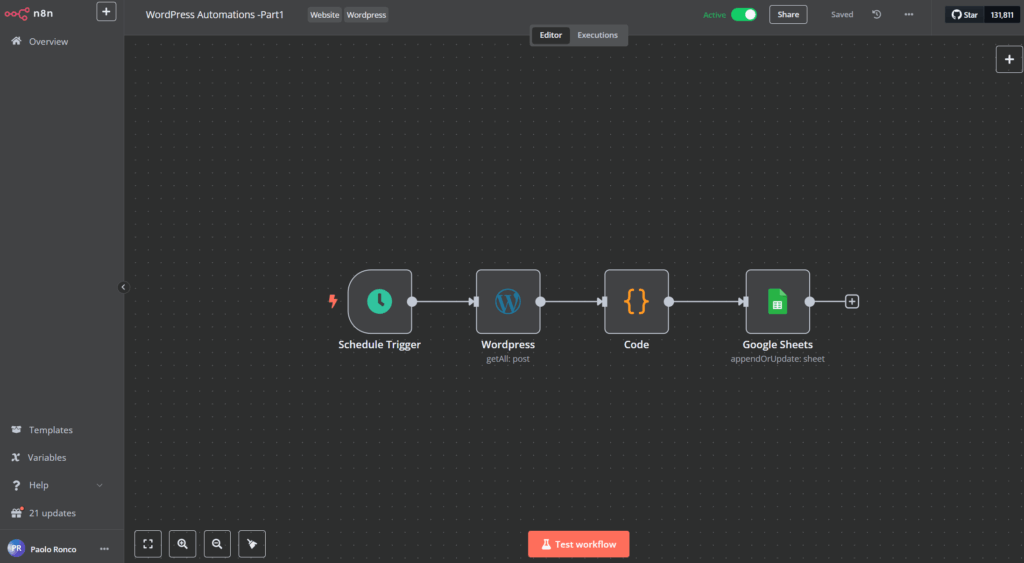
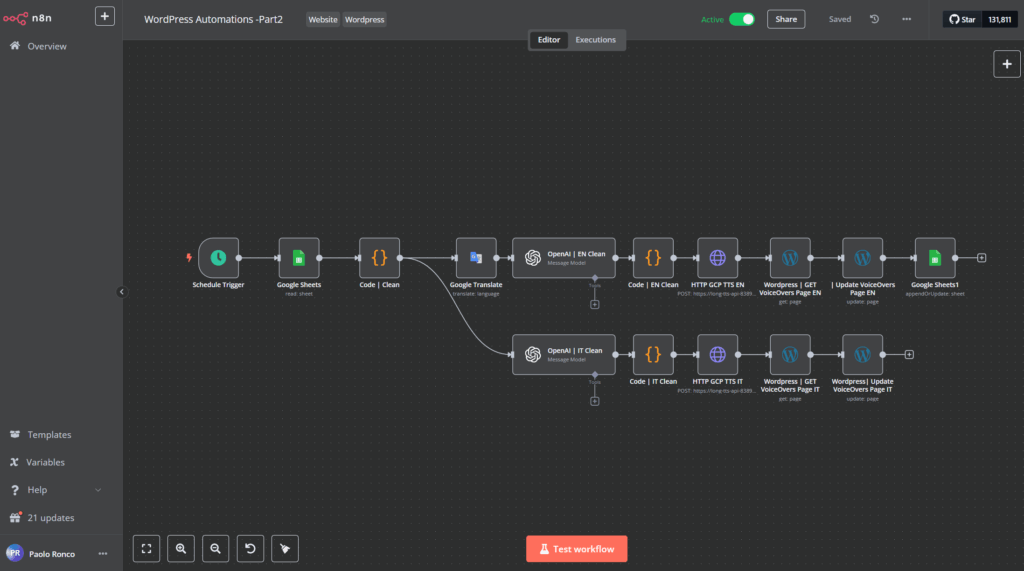
Every day, at a predefined time, n8n reads a Google Sheets document that serves as “the to-do list”.
Here I keep track of posts with their main fields (title, content, date, ID, link).
If a post hasn’t been processed yet, the flow selects it for processing.
2. Text Cleaning and Preparation
Before generating the audio, the text is normalized:
- removal of special characters, symbols or pieces of code that could disrupt speech synthesis,
- automatic translation into English to have two parallel versions,
- further cleaning to ensure the result is readable and fluid.
3. Audio File Generation
Once the text is ready, it’s sent to a Google Cloud TTS (Text-to-Speech) service.
The workflow produces two .wav files:
- one in Italian,
- one in English.
This way each article has its “audible” version in both languages.
4. Update on WordPress
After the generation is complete, n8n automatically updates two pages of the site:
- one that collects Italian voiceovers,
- one for those in English.
A block with title, date, link to the original article and a player ready for listening is added.
5. Closing the Loop
Finally, the workflow updates Google Sheets marking the post as “done”.
This way I avoid processing the same content twice and always have control over the status of the work.
✅ Results and Benefits
With this system:
- every article published on WordPress becomes an automatically formatted resource (text + audio),
- I can offer a more accessible and modern experience to readers,
- I have a clear and verifiable tracking of the process.
Workflow in Detail:
? Skills Applied
- Process Automation with n8n (triggers, conditions, updates to external APIs),
- Cloud Integration with Google Sheets and Google Cloud TTS,
- Multilingual Management (translation + synthesis),
- Flow Optimization to ensure each step is secure and repeatable.
? Conclusion
This workflow represents an evolution compared to my previous implementation on Make.com.
Thanks to n8n in self-hosting, I have gained more control, security, and the possibility to extend the project in the future, for example with:
- new languages,
- reverse transcriptions from audio files,
- automatic usage reports.