Automate WordPress with Make.com: From Post to VoiceOver in the Cloud
? GitHub : paoloronco/makecom-wordpress-ttsvoiceover-notiondb ? Publication on ReadyTensor : GCP TTS on WordPress | WordPress to Voice In the world of…
? GitHub: paoloronco/makecom-wordpress-ttsvoiceover-notiondb
? Publication on ReadyTensor: GCP TTS on WordPress | WordPress to Voice
In the world of technology and cybersecurity, automation is not just about efficiency but also about precision and security.
As a CyberSecurity Analyst with a strong passion for tech automation, I have developed an advanced workflow on Make.com that allows me to intelligently manage the entire content lifecycle on WordPress, transforming it into multiformat resources and archiving it in an organized manner across multiple platforms.
In this article, I show you how my workflow works, what makes it effective, and how it can be adapted to other contexts, always with a focus on scalability and security.
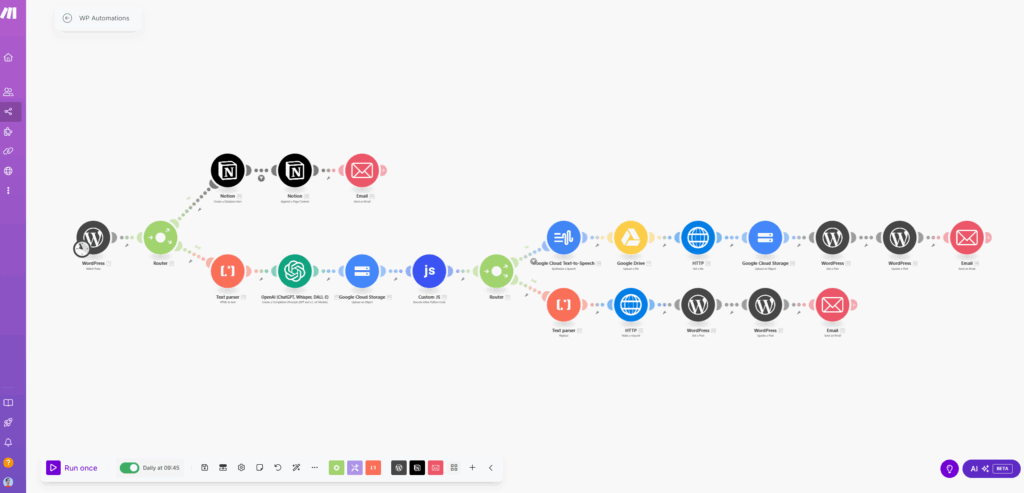
? Workflow Objective
Automate the management of posts on WordPress in two directions:
- Structured storage and notification (via Notion and Email),
- Automatic generation of voiceover audio and dynamic update of the post on the site.
? Overview of the Process
Step 1 – Watch Post from WordPress
The flow is triggered every time a new post is published (or updated) on WordPress, thanks to the “Watch Post via API” module.
Step 2 – Router
The router splits the flow into two independent branches, which perform parallel operations on the same content.
Branch 1 – Storage in Notion Database
- The post content is added to a Notion table, useful for tracking, future consultation, and content management as a knowledge base.
- At the end, an email notification confirms the correct insertion of the post.
✅ Useful for: structured backup, content history, internal documentation.
Branch 2 – Generation of VoiceOver Audio
1. Text Parsing and Optimization
- The post content is converted from HTML to clean text.
- The text is then optimized and reformatted using an OpenAI GPT model, to improve readability and prepare it for voice synthesis.
2. Upload to Google Cloud Storage
The text is uploaded in .txt format to a private bucket on GCP.
3. Control with Custom JS
A custom JavaScript script checks the generated file size:
- If it is less than 5000 bytes, the text is short → use standard TTS synthesis.
- If it is greater, a longer voiceover path is activated.
The JavaScript code returns a boolean value that is handled by a second router.
4. Router: Choice Between Short and Long TTS
If the text is < 5000 bytes:
- The file is sent to the Google Cloud Text-to-Speech module to generate the
.wavaudio. - The audio is uploaded to Google Drive.
- It is downloaded via an HTTP module and then re-uploaded to a public GCP bucket.
- The updated post content on WordPress is retrieved.
- The new audio is integrated within the post with a custom HTML block (see example below).
- Final email confirmation.
If the text is > 5000 bytes:
- An advanced Text Parser is applied that removes special characters and further cleans the content.
- An HTTP module activates a Cloud Run Function on GCP to generate a long voiceover.
- In this case as well, the post content is retrieved, updated with the new audio, and a final email notification sent.
Audio Integration on WordPress
The audio is automatically added to the post with this HTML snippet:
htmlCopiaModifica<hr> <h3>? VoiceOver: {{1.title}}</h3> <h5>Data: {{66.date}}</h5> <h5>Link articolo: {{1.link}} </h5> <p>PostID:{{1.id}}</p> <audio controls> <source src="https://storage.googleapis.com/wp-voiceovers/{{1.id}}.wav" type="audio/mpeg"> </audio>
This allows users to listen to the content directly on the page, making the blog accessible, enjoyable, and modern.
Security & Best Practices
Given its articulated nature, I have paid maximum attention to security:
- Use of API keys, OAuth, and tokenized access,
- Strictly controlled permissions for Cloud Storage buckets,
- JS logging for internal controls and fallbacks,
- Modularity and full traceability of each step.
Every step is verifiable, idempotent, and can be isolated during debugging.
✅Conclusions
This workflow is the result of months of optimization and real-world testing.
It allows me to publish content on WordPress and, without any manual intervention:
- archive it,
- improve it,
- transform it into audio,
- and make it publicly available.
It is a solution that combines intelligent automation and cybersecurity awareness, designed for those who work with content and want to save time without sacrificing control.
If you want to implement something similar, or discuss automations for your stack, write to me!