AI Instagram Reels: Advanced Automation with Make.com, OpenAI and Google Cloud
? GitHub : paoloronco/makecom-openai-gcp-instagramreel ? Publication on ReadyTensor : Automated Instagram Reels with AI Introduction: more than one project…
? GitHub: paoloronco/makecom-openai-gcp-instagramreel
? Publication on ReadyTensor: Automated Instagram Reels with AI
Introduction: More Than One Social Project
The “AI Instagram Reels” project was born with the goal of automating content creation for social media, but it turned out to be much more than that: an advanced exercise in orchestrating between generative AI, cloud computing, and no-code automation.
During development, I acquired cross-functional skills on:
- Complex Automations with Make.com
- Using OpenAI APIs (ChatGPT, TTS, DALL·E)
- Managing Files and Buckets on Google Cloud Platform
- Deploying Containers on Google Cloud Run
- Integrating Multiple Tools into a Single Smooth Workflow
More than just an “Instagram” project, it was a sandbox for building a scalable and intelligent infrastructure capable of generating and publishing multimedia content from a textual prompt.
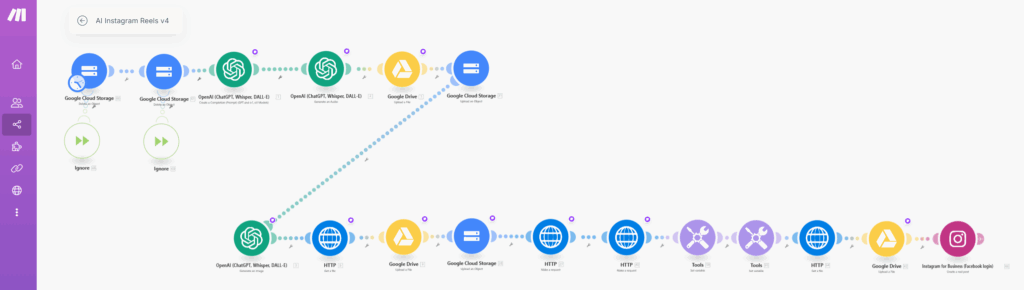
Technical Infrastructure: AI, Cloud, Automation, and File Management
Generative AI: Original Content at the Heart of the Project
The creative core of the project is OpenAI’s artificial intelligence. Using GPT-4o, I set up a specific prompt to generate short but engaging scripts optimized for storytelling in a Reel. The text is then transformed into voice using TTS-1, resulting in a clear and natural .mp3 audio file. To complete the visual part, DALL·E 3 generates a vertical flat-style image designed as the cover art for the content.
Google Cloud Run: Custom Video Microservice
One of the most interesting and advanced aspects of this project was undoubtedly developing the backend on Google Cloud Platform, particularly using Cloud Run combined with Docker.
I created a custom microservice, containerized via Docker, capable of dynamically merging a .png (cover image) file with an .mp3 (voice-over) file to return a .mp4 video. To do this, I:
- Wrote a Python script (
main.py) for file merging - Configured a Docker environment for execution
- Created a Docker repository on Artifact Registry
- Deployed the service on Cloud Run, making it publicly accessible via HTTP POST
The infrastructure is highly scalable and serverless: Cloud Run runs the service only when called, reducing costs while ensuring consistent performance.
To link Make.com to this endpoint, I also created a Service Account with appropriate permissions, configured OAuth, and defined necessary policies for secure communication between the two environments.
File Retrieval and Management: Everything Passes Through the Cloud
Once the .mp4 video is generated, it is saved on Google Cloud Storage, which serves as a central repository for all temporary and final files. To get the public link to the most recent file, I integrated an API call directly from the Make.com pipeline, which queries the bucket and returns files sorted by creation date. This way, I can identify the correct output without ambiguity.
This function is crucial for maintaining fluid automation, especially when the system runs multiple times a day.
Google Drive: Backup Archive and Traceability
Google Drive is not used as an active workspace but as a backup space, useful to always have a copy of generated content available. In the Make.com pipeline, I added specific steps that upload raw images and audio to a shared Drive folder.
To achieve this integration, it wasn’t enough just to link: I had to pass through the Google Cloud Console, create a project, enable necessary APIs, configure an OAuth authentication system, and create a dedicated Service Account to allow Make.com to access Google Drive securely and controlledly.
This phase was very formative because it allowed me to understand how credentials work in the full cycle between third-party environments and Google Workspace.
Conclusion
“AI Instagram Reels” wasn’t just a creative project but a true distributed architecture built through the deep integration of advanced tools like OpenAI, Make.com, and Google Cloud Platform.
Far from being a no-code project, this work required real technical skills: from writing Python code for video generation to managing Docker containers, configuring service accounts, OAuth permissions, and deploying on Cloud Run.
The result is a fully automated system but highly controllable, scalable, and customizable, capable of producing video content from scratch with precision, speed, and coherence.
More than just a flow for creating Reels, it’s an intelligent multimedia production machine ready to be reused, extended, or adapted to other contexts—educational, branding, social media automation, or content marketing.
This project has consolidated my ability to manage complex cloud environments, connect external APIs, design robust pipelines, and write code that interacts with distributed infrastructures. An experience I will carry into every new project.